Payment help
Paying by PayID
Our PayID is a business number, not a phone number. Every banking app can pay one, but the option is easy to miss. Pick your bank and follow the taps.
- PayID type
- ABN / ACN
- Number
- 701154305
- If asked for 11 digits
- 82701154305
- Name your bank shows
- Quantified Peptides Pty Ltd
- Description
- Your order reference (QP-…)
Stuck at any step? Message +61 451 298 839 on WhatsApp with a screenshot and we will walk you through it.
Your bank
CommBank
- 01Tap Pay
Open the CommBank app and tap Pay.
- 02Tap Pay someone
Tap Pay someone, then PayID. You land on a screen titled PayID Payment.
- 03Tap Other
Across the top there are three tabs: Mobile, Email and Other. Tap Other. This is the step most people miss — the business number lives under Other.
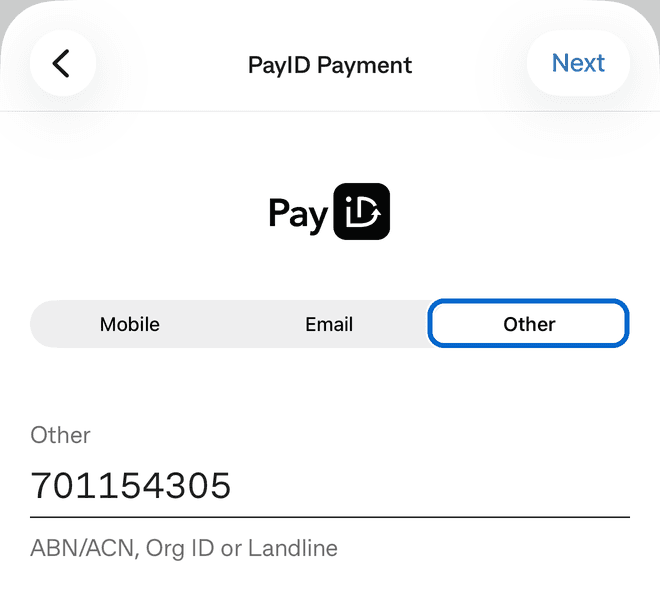
- 04Type 701154305
Type 701154305 in the Other field. The small print under it says ABN/ACN, Org ID or Landline — that is the right field. Tap Next.
- 05Shows Quantified Peptides Pty Ltd
A box appears: QUANTIFIED PEPTIDES PTY LTD has registered 701154305 as a PayID. Tap OK. If a different name appears, do not pay — contact us.
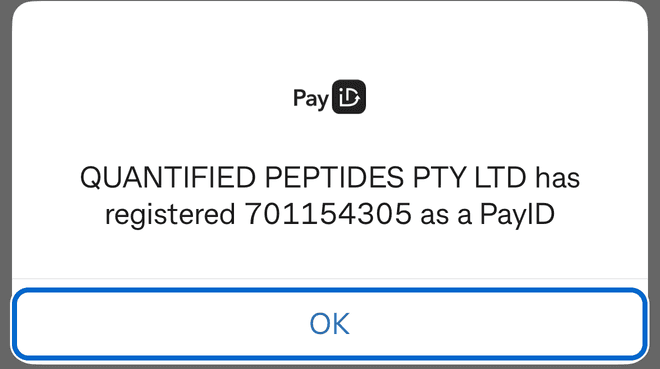
- 06Type Amount · Description
Enter the exact order total. In the Description or Reference field type your order reference — it starts with QP- and is on your order page and in your email. This is how we match your payment to your order.
- 07Pay
Confirm the payment. It usually lands within a minute, and we email you once it is matched.